
 生命周期
生命周期
# 生命周期
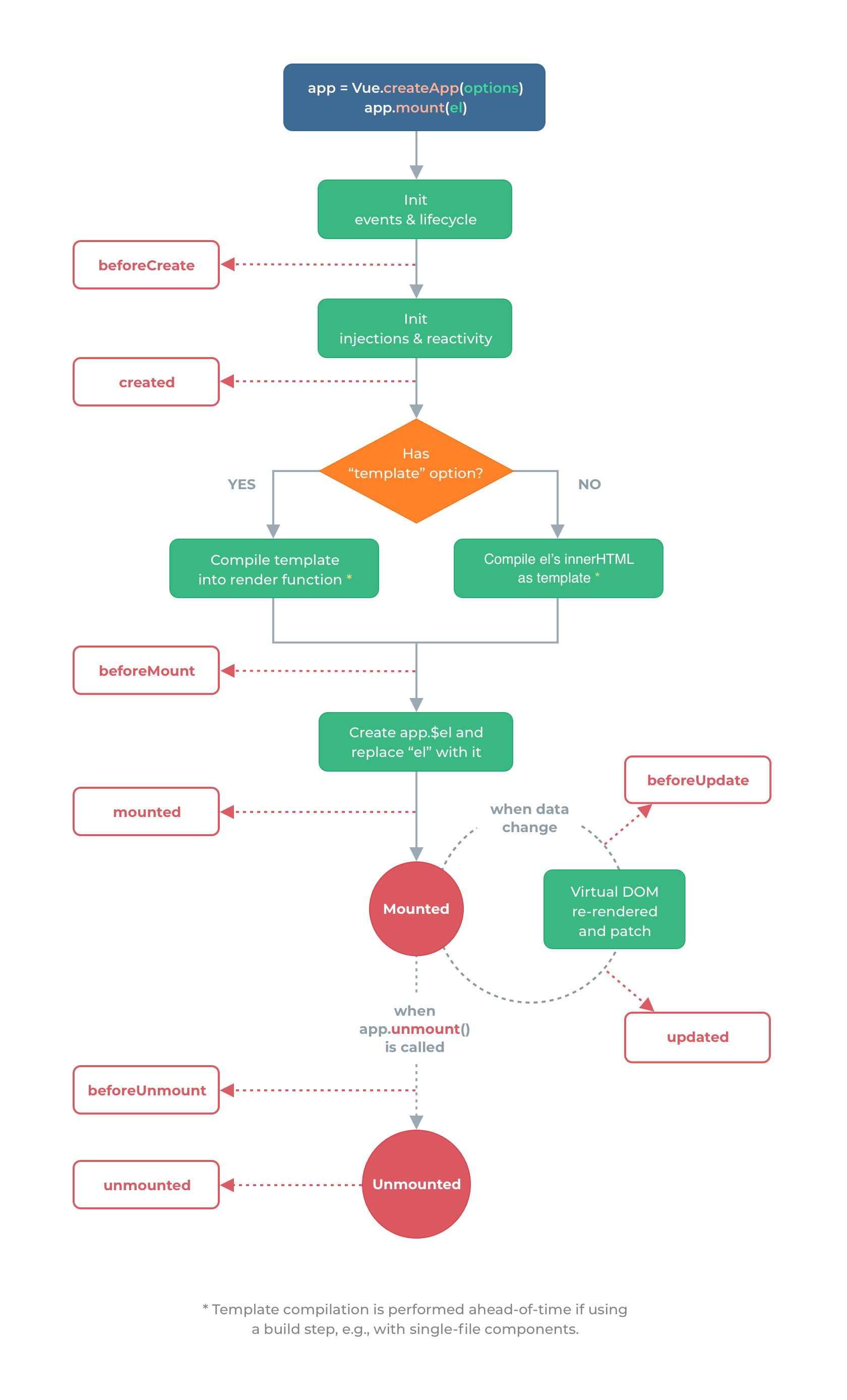
# 生命周期函数
注意 Vue2 的 destroy 等已被 unmount 等取代
动态组件可以使用 activated 和 deactivated 这两个生命周期钩子函数来监听
<!DOCTYPE html>
<html lang="en">
  <head>
    <meta charset="UTF-8" />
    <meta name="viewport" content="width=device-width, initial-scale=1.0" />
    <title>Hello World</title>
  </head>
  <body>
    <div id="root">
      <div>{{counter}}</div>
    </div>

    <script src="https://unpkg.com/vue@next"></script>
    <script>
      // 生命周期函数:在某一刻会自动执行的函数
      // 执行完 Vue.createApp 并且 mount 后开始进行生命周期函数

      let options = {
        data() {
          return {
            counter: 1,
          }
        },
        beforeCreate() {
          console.log(
            '[beforeCreate]: after init events & lifecycle。事件绑定、生命周期函数等。即 Vue 应用生成之前,Vue.createApp',
            '。root innerHTML: ',
            document.getElementById('root').innerHTML // 空
          )
        },
        created() {
          console.log(
            '[created]: after init injections & reactivity。依赖注入、响应式(数据双向绑定)等。即 Vue 应用生成之后,Vue.createApp',
            '。root innerHTML: ',
            document.getElementById('root').innerHTML // 空
          )
        },
        // 组件中有 template 则编译为 render 函数,没有则使用 mount 挂载的 el DOM 元素作为 template 进行编译
        beforeMount() {
          console.log(
            '[beforeMount]: template(或 el) 的 innerHtml 被编译成render函数后。或称为组件被渲染到页面前。app.mount()',
            '。root innerHTML: ',
            document.getElementById('root').innerHTML // 空,此时没有任何内容!
          )
        },
        mounted() {
          console.log(
            '[mounted]: after Create app.$el and replace "el" with it。 组件被渲染到页面后。此时页面的所有数据都可以正常展示!!!app.mount()',
            '。root innerHTML: ',
            document.getElementById('root').innerHTML // <div>1</div>
          )
        },
        beforeUpdate() {
          // 执行 vm.counter ++ 改变了 data 中数据即可
          console.log(
            '[beforeUpdate]: when data change, before Virtual DOM re-rendered and patch。即 data 变化,且页面重新渲染前执行',
            '。root innerHTML: ',
            document.getElementById('root').innerHTML // <div>1</div>
          )
        },
        updated() {
          // 执行 vm.counter ++ 改变了 data 中数据即可
          console.log(
            '[updated]: when data change, after Virtual DOM re-rendered and patch。即 data 变化,且页面重新渲染后执行',
            '。root innerHTML: ',

            document.getElementById('root').innerHTML // <div>2</div>
          )
        },
        beforeUnmount() {
          console.log(
            '[beforeUnmount]: when app.unmount() is called。即 Vue 应用失效时,类比 beforeMount',
            '。root innerHTML: ',
            document.getElementById('root').innerHTML // <div>2</div>
          )
        },
        unmounted() {
          console.log(
            '[unmounted]: when app.unmount() is called。即 Vue 应用失效,且 DOM 完全销毁之后,类比 mounted',
            '。root innerHTML: ',
            document.getElementById('root').innerHTML // 空
          )
        },
      }

      // Vue.createApp 创建 Vue 应用
      // mount 装载到哪里,即在 id = root 的 html 中使用 vue
      const app = Vue.createApp(options)
      const vm = app.mount('#root')

      // vm.$data.counter = 2
      vm.counter = 2
      // app.unmount()
    </script>
  </body>
</html>
1
2
3
4
5
6
7
8
9
10
11
12
13
14
15
16
17
18
19
20
21
22
23
24
25
26
27
28
29
30
31
32
33
34
35
36
37
38
39
40
41
42
43
44
45
46
47
48
49
50
51
52
53
54
55
56
57
58
59
60
61
62
63
64
65
66
67
68
69
70
71
72
73
74
75
76
77
78
79
80
81
82
83
84
85
86
87
88
89
90
91
92
93
94
95
96
2
3
4
5
6
7
8
9
10
11
12
13
14
15
16
17
18
19
20
21
22
23
24
25
26
27
28
29
30
31
32
33
34
35
36
37
38
39
40
41
42
43
44
45
46
47
48
49
50
51
52
53
54
55
56
57
58
59
60
61
62
63
64
65
66
67
68
69
70
71
72
73
74
75
76
77
78
79
80
81
82
83
84
85
86
87
88
89
90
91
92
93
94
95
96
编辑 (opens new window)
上次更新: 2022/03/23, 17:55:39